The Motion Sensor That Cannot Read a Room
A motion sensor detects a change, not a person. Learn how to interpret alerts, check what else may have triggered them, and avoid false certainty.
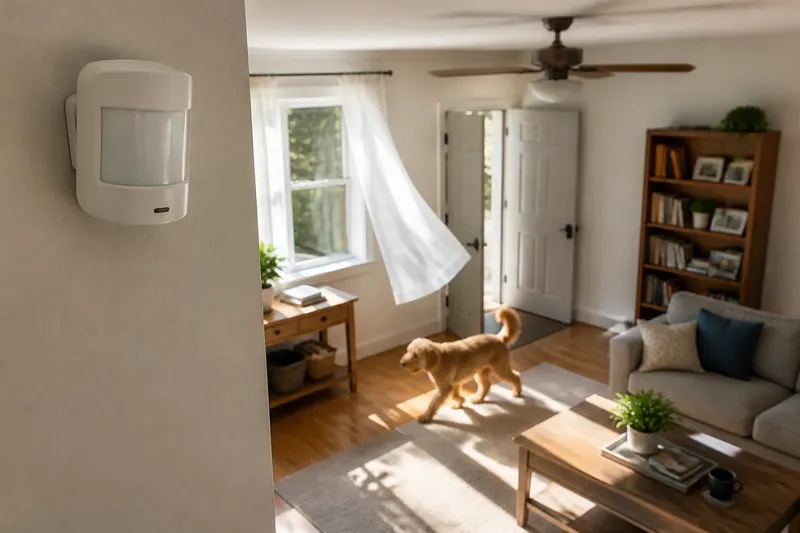
A motion sensor reports a change in its field of view; it does not tell you who caused it. If a hallway sensor switches on while you are in another room, the signal alone cannot distinguish a family member from a pet, a moving curtain, or another source of change. Treating that alert as an identification is the mistake this routine is designed to prevent.
Over one week, you can learn what a particular sensor responds to without treating its alerts as proof of presence or absence. Keep a small paper log or use the device’s event history, if available. Record the time, the sensor’s response, what you could independently observe, and any uncertainty. The aim is not to turn the sensor into a person detector; it is to understand the limits of the signal in that room.
What does a motion sensor actually report?
“Motion sensor” describes a broad purpose, not a single way of sensing. A common passive infrared sensor responds to changes in infrared energy across its viewing area. A camera-based system may use changes between images, while a microwave sensor detects changes in reflected radio waves. Some products combine methods.
Those signals can support a simple output such as “motion detected.” That output is a device’s interpretation of a change that met its internal conditions. It is not a description of the source, and it may not mean a body crossed the room in the way a person imagines.
Even when a system includes a camera, an alert may be produced by motion analysis before anyone reviews an image. The sensor’s output and a confirmed identification are different kinds of information. Check what the product actually records and presents before assuming that an alert includes a usable view or a reliable account of what happened.
How should you observe it over a week?
Pick one sensor and one ordinary room. Before you change settings or move objects, note the sensor’s location, its apparent viewing direction, nearby doors and windows, and the main sources of movement. Do not open the device or alter wiring. For configuration or installation questions, follow the manufacturer’s instructions and local rules.
Use this simple routine, adjusting the pace to your household:
- Day one: Write down the sensor’s exact alert wording and where the event history is shown. Note whether the device labels events as motion, occupancy, activity, or something else; these labels are not interchangeable.
- Day two: Observe the room during a normal period when someone is present. Record visible movement and the alert time, but do not deliberately create a risky situation or rely on the sensor for security.
- Day three: Check what can move without a person walking through the room: a curtain near an open window, a swinging door, a ceiling fan, a pet, or shifting light on a camera view. Record only what actually applies.
- Day four: Look for patterns in alert timing. A response around a recurring household activity may be associated with that activity, but timing by itself does not identify a cause.
- Day five: Compare a period with no visible activity against the event history. If the device records an alert, mark the cause unknown rather than filling the gap with a guess.
- Day six: Review the room from the sensor’s position, without blocking it or handling the device. Note sightlines and anything that might enter or leave its field of view.
- Day seven: Read the log as a set of observations. Decide whether any pattern is clear enough to guide a modest adjustment, or whether the evidence remains uncertain.
Say you have a hallway sensor that reports motion after a window is left open. You notice the curtain shifts near the sensor’s view on some of those occasions, so you record that as a possible trigger and ask another household member to check the hallway when convenient. If alerts then occur without an observed person, the sensible entry is still “cause unknown,” not “curtain confirmed.” The sequence helps narrow a question; it does not prove an identity.
What can trigger an alert besides a person?
The answer depends on the sensor type and the room. A passive infrared unit may respond to a changing heat pattern in its view. A camera-based detector may react to shadows, headlights, reflections, or changes in the image. A microwave unit may register movement beyond what looks like an obvious line of sight, depending on its design and placement.
Household details matter too. Pets, moving plants, loose curtains, fans, sunlight, and a door opening can all complicate interpretation. These are possibilities to consider, not a universal list of causes. A trigger that matters for one device or room may not affect another.
Also consider the opposite problem: a person may be present without producing a new alert. Someone might remain still, move in a way the sensor does not readily detect, or stay outside its effective coverage. A quiet event history therefore does not establish that a room is empty.
What do people often ask about motion sensors?
Can a motion sensor tell whether a person is in a room?
Most basic motion sensors report a detected change, not a person’s identity or even confirmed human presence. A system may offer more detailed information, but check the specific product’s capabilities rather than inferring them from the word “motion.”
Can a motion sensor tell a person from a pet?
Some devices offer settings intended to reduce pet-related alerts, but that does not make every event identifiable. A setting changes how the device processes signals; it is not a direct confirmation of what caused a particular alert.
Does no alert mean nobody entered?
No. A sensor can miss movement because of its coverage, the way someone moves, or the device’s detection conditions. If you need dependable access records or a safety measure, choose a system designed for that purpose and seek qualified advice where appropriate.
Why does the device say “occupancy” rather than “motion”?
“Occupancy” may be a product’s label for an inferred state, often based on one or more sensor inputs and the device’s rules. It does not automatically mean the system has identified a person; consult the product documentation for how that label is assigned.
How can you use alerts without overreading them?
Match the decision to the strength of the information. A motion alert can be useful for turning on a light, prompting a glance at an entry, or marking a time for later review. It is a weak basis for accusing someone, declaring a room empty, or making a safety-critical decision on its own.
If an alert has consequences, seek another source of information suited to that decision. That might mean checking the room directly, reviewing a system designed to provide a relevant record, or asking a qualified professional to assess a security or safety concern. Avoid treating an automated label as a substitute for judgment.
When settings are available, change one ordinary setting at a time and note the date and result. For instance, you might adjust an allowed sensitivity option after repeated alerts from a known environmental source, then observe whether the pattern changes. Keep the original configuration in mind so you can reverse an adjustment that creates missed detections.
What should your log help you decide?
At the end of the week, separate entries into three plain categories: observed source, plausible source, and unknown. “Observed source” means you directly saw the event at the relevant time. “Plausible source” means the timing or circumstances fit, but you did not confirm it. “Unknown” is a useful result, not a failure to interpret the sensor.
Use the categories to decide whether the device’s current role makes sense. If the purpose is to switch on a hallway light, occasional uncertain alerts may be acceptable. If the purpose is to establish exactly who entered, a motion sensor alone cannot answer that question, and changing its sensitivity will not turn detection into identification.
The most useful habit is to preserve the distinction in your notes and decisions: a motion sensor detected a change, while the cause remains a separate question. A careful motion sensor log makes that boundary visible, so each alert can prompt an appropriate check without being mistaken for a person’s name or a complete account of the room.